Invoice extraction and spending patterns
Helping freelancers collect invoices from email and see spending patterns so they know where their money is going
Get a direct link
By hitting Send, I agree to the Privacy Policy and Terms of Service

Auto-detect invoices
Never miss an invoice
McTyson auto-detects invoices buried in Gmail
- One clean, searchable invoice feed
- Multilingual detection - from keywords you control
- Locate a missing invoice in seconds
- Direct access to message in Gmail
- Export list or download an invoice in one click


Your spending stories
Just so you know
See where your money is going with short stories on hidden patterns
How much did you spend on AI tools, subscriptions, travel, and more over time? McTyson can tell you


Know your spending
Repeating payment signals
McTyson uncovers subscriptions and payment patterns over the year
- Catch repeating payments and subscriptions
- See a year of spending, grouped by service provider
- Drill into any provider - see totals and rhythm changes
- Spot where your spending jumped


Security and privacy first
Security and data protection
Securely connect with Google and you're done!
- Read-only access
- Never shared, sold, or used for advertising or marketing
- Delete everything, anytime
- Independently reviewed by TAC Security under Google's CASA review
Plans and pricing
Always affordable
For the price of a coffee, your invoices and spending patterns - always ready.

Tips and shortcuts
Paper invoices? Email them to yourself.
Snap a photo, send it to your inbox, and it’s there. No apps, no extra steps. Just a simple habit that keeps everything together.

Q&A
Frequently asked and answered
Yes. McTyson uses read-only access — your Gmail is never changed, moved, or deleted. It's been independently security-reviewed by TAC Security under Google's CASA program, and your data is never sold or used for advertising.
Absolutely. From the settings panel you can delete your account — every record and setting is removed for good.
Yes. In the settings panel, add a keyword in any language and McTyson will scan your inbox for matching messages. You can add or remove keywords anytime.
A few things can cause this: the email wasn't recognized as an invoice, it used an unusual format, it was sent to a different address, or it was deleted. Some providers also don't attach an invoice to every charge. Adding a keyword from that email (or the vendor's name) in Settings usually helps McTyson surface it. For your privacy, McTyson never logs into your provider accounts.
A free account shows your current month — think of it as an unlimited trial with a few limits, which keeps processing costs modest for free accounts.
Subscribe now and you keep this price. As we add features and connectors our costs grow, so pricing may rise for new users over time — but early subscribers stay on their original plan and get the new features at no extra cost whenever we can.

I can't believe how much time I wasted digging through my inbox
Everything's there now. I just grab what I need, when i need it.
Ron Elmor
Fullstack designer
Upcoming releases
We are busy - new features in the pipeline
Made for freelancers - not accountants
in beta :
Expense summary - just so you know.
A compact summary of expenses while avoiding the financial tool headache
coming soon :
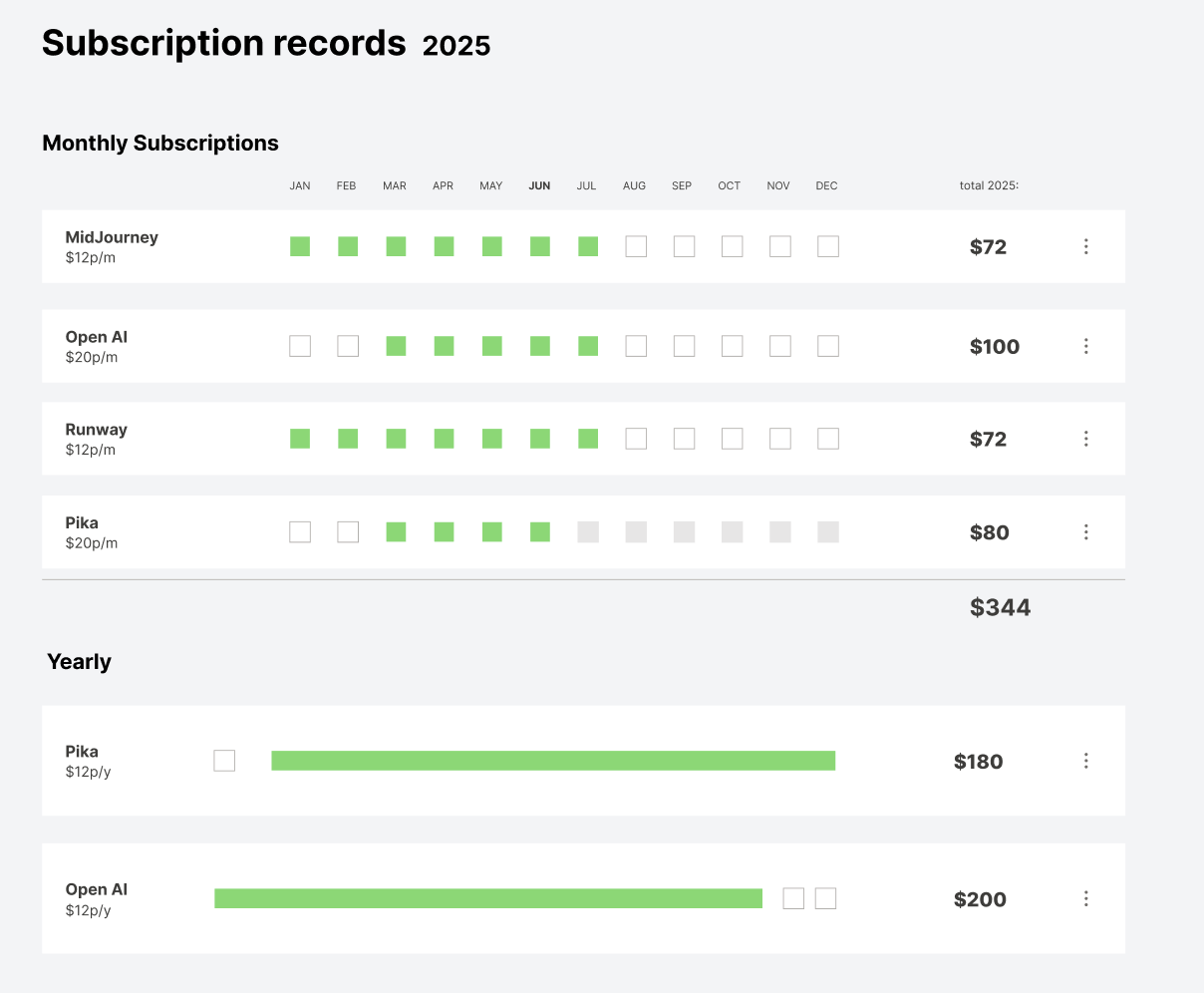
Subscription Timeline
Get visibility on your subscriptions
I can't believe how much time I wasted digging through my inbox.
Everything is clean and available now. I just grab what I need, when i need it.
Ron Elmor
Fullstack designer
Upcoming releases
We are busy - new valuable feature in the pipeline
Made for freelancers - not accountants
We’re continuously expanding McTyson with care—adding what matters, without turning it into a complex financial tool. As freelancers, we value clarity and simplicity: seeing what’s relevant without configuring systems or digging for insights. That’s the direction guiding every new feature.
in beta :
Expense summary - just so you know
A compact summary of expenses while avoiding the financial tool headache
coming soon :
Subscription Timeline
Get visibility on your subscriptions


